Download or deploy an SDXL pixel-art game asset workflow
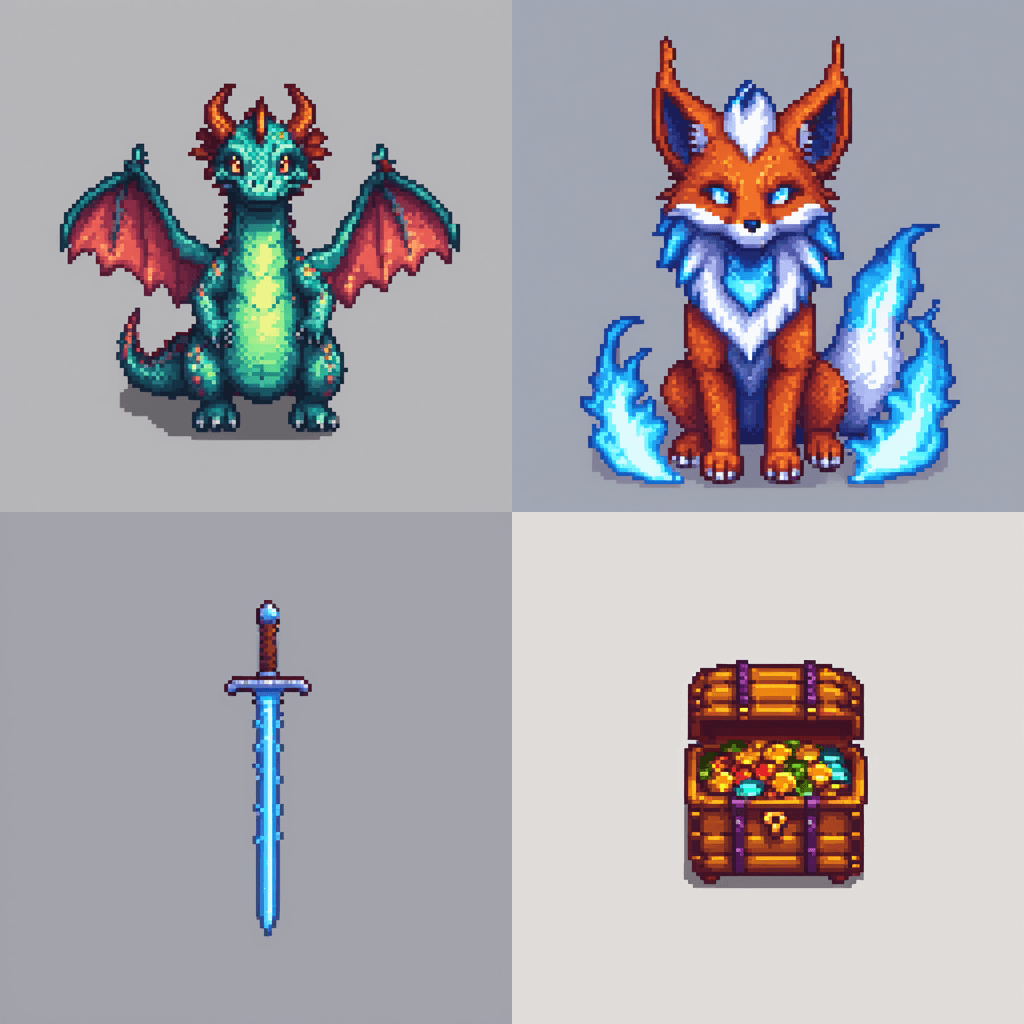
Generate RPG creatures and item icons with one native-node ComfyUI graph using SDXL plus two openly linked LoRAs, or deploy the verified hosted template.
Start from a specific workflow outcome, review the expected GPU and cost profile, then deploy the hosted ComfyUI template when the fit is right.
- Workflow
- SDXL + 2 LoRAs
- Cloud GPU
- A6000 48 GB
- First deploy
- 10–30 min
- Per asset
- ~$0.02
Download the verified ComfyUI workflow
Drag the JSON into ComfyUI. One queue runs a 1024×1024 creature lane and a 512×512 item-icon lane through the same SDXL and LoRA stack.
Download workflow JSONFresh-production render verified July 11, 2026
The bundled checkpoint and both LoRAs were confirmed on a fresh deployment, and six output assets were reviewed before the workflow was published.
Required model files
Use these exact filenames and directories when running locally.
| Role and file | Directory | Size |
|---|---|---|
Checkpoint sd_xl_base_1.0_0.9vae.safetensors | models/checkpoints | ~6.9 GB |
Pixel-art LoRA pixel-art-xl.safetensors | models/loras | ~163 MB |
Character LoRA smol-animals-sdxl.safetensorsDownload zhibi-sdxl.safetensors and save it under the filename used by the workflow. | models/loras | ~218 MB |
Direct answer
Can ModelPilot host an SDXL ComfyUI workflow for 2D game assets?
Yes. ModelPilot hosts the 2D Game Asset Generator as an editable ComfyUI workspace and publishes the verified native-node JSON for local use.
Key facts
- iThe graph uses SDXL base plus Pixel Art XL and Smol Animals LoRAs.
- iOne queue runs both a 1024×1024 creature lane and a 512×512 item lane.
- iThe hosted template and downloadable graph use the same model filenames.
Next step
- 1Download the JSON when the checkpoint and both LoRAs are already available locally.
- 2Use /deploy/game-assets-2d when the hosted template is the lower-friction path.
- 3Use /check first when the user has their own ComfyUI workflow JSON.
Not a fit when
- SDXL often paints a background even when asked for transparency; request a plain white background and remove it afterward.
- Review each model card before using generated assets commercially.
Why this deployment path works
The page is built around a specific workflow outcome, a real template, a visible demo artifact, and a direct path into the hosted deployment flow.
Two useful lanes, one graph
The workflow generates creatures and item icons together while keeping the prompts and output settings independently editable.
No custom nodes required
The graph uses native ComfyUI loaders and samplers; the dependencies are the SDXL checkpoint and two listed LoRA files.
The naming gotcha is documented
The Smol Animals download must be saved as smol-animals-sdxl.safetensors so the LoraLoader resolves it.
End-to-end path
Move from a clear creative intent to a hosted workflow without rebuilding the ComfyUI environment from scratch.
- 1
Download or deploy
Load the JSON locally or start the hosted game-assets template.
- 2
Install the three model files
Place the SDXL checkpoint and two LoRAs in the directories shown in the requirements table.
- 3
Tune each prompt lane
Edit creature and item prompts independently; bypass the second LoRA on the item lane if desired.
- 4
Generate and clean up
Review anatomy and fine details, then remove backgrounds or resize outputs in the game-asset pipeline.
Use this workflow when
- You need quick concept art for RPG creatures, enemies, props, or item icons
- You want both creature and item lanes visible in one editable graph
- You are comfortable reviewing and cleaning generated assets before shipping
Choose another path when
- You require production-ready sprite sheets with animation frames and exact pivots
- You need guaranteed transparent backgrounds directly from SDXL
- You have not reviewed the checkpoint and LoRA licenses for your commercial use
Frequently asked questions
Does the workflow create transparent PNGs?
Not reliably. SDXL may paint a scene despite a transparency prompt. A plain white background followed by background removal is more dependable.
Why does the Smol Animals LoRA need renaming?
The source file downloads as zhibi-sdxl.safetensors, while the verified graph references smol-animals-sdxl.safetensors. Save it under the referenced name or select it manually in the loader.
Can I use the workflow without ModelPilot?
Yes. The JSON download and all three source links are public. The hosted option is for users who prefer not to manage the GPU and model installation.
Ready to deploy the workflow?
Deploy the 2D Game Asset Generator when you want the editable graph without downloading and wiring the SDXL stack yourself.